

Definition of Continuous Integration
Continuous integration means merging code often and running automated tests and scripts right away. It helps teams keep code quality high and catch problems early.
Why Continuous Integration Matters
Continuous integration is vital for software development because it helps stop code changes from causing breaks in the software.
When it works well, a CI flow can find issues, fix them, and prove the fix worked with no manual step. But some teams treat it only as a way to add code to the repo. That can hurt code quality.
Overview of Continuous Integration Tools
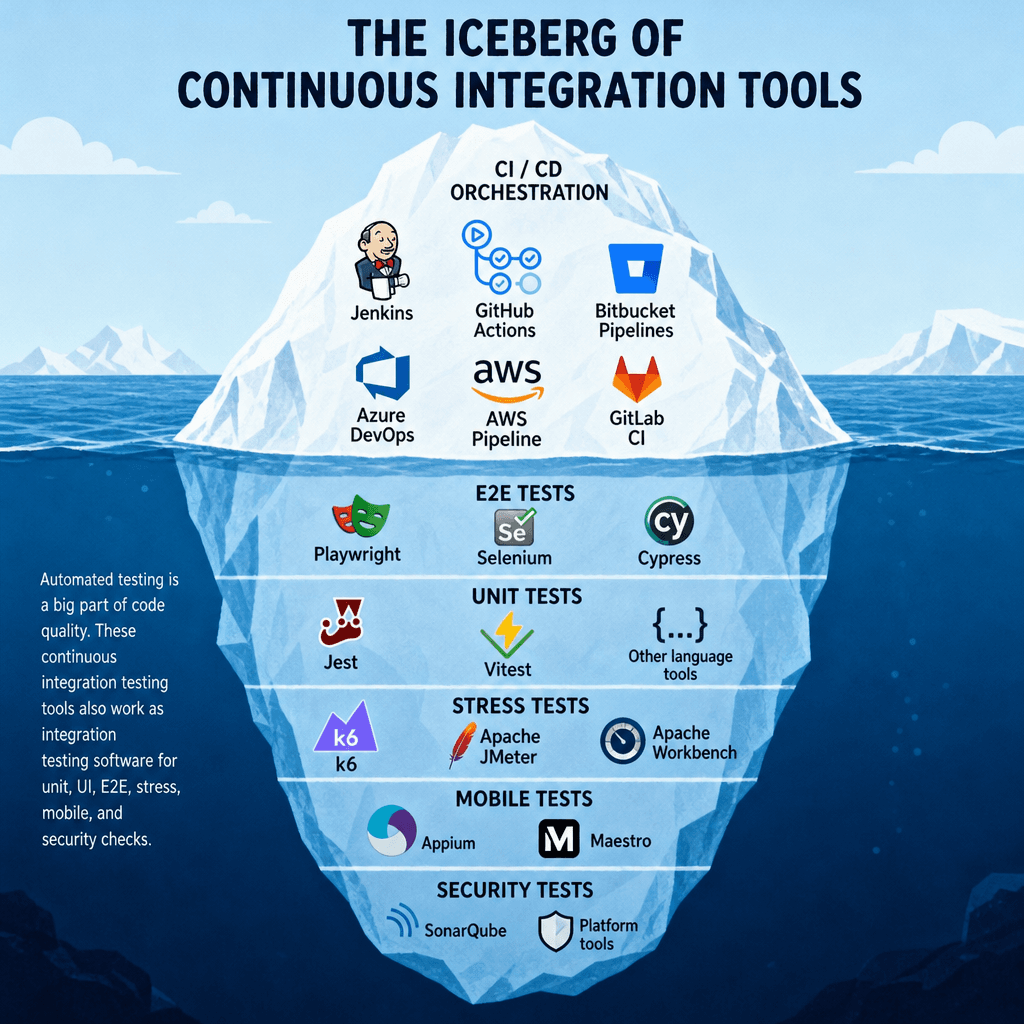
Types of Continuous Integration Tools
Continuous Integration Server Tools
Server tools set up the steps in a CI flow. They often fit one platform, because many teams want to keep their code stack inside one ecosystem.
Popular examples include:
- Jenkins
- GitHub Actions
- Bitbucket Pipelines
- Azure DevOps
- AWS pipeline
- GitLab CI
Continuous Integration Testing Tools
Automated testing is a big part of code quality. These continuous integration testing tools also work as integration testing software for unit, UI, E2E, stress, mobile, and security checks.
- E2E: Playwright, Selenium, Cypress
- Unit tests: Jest, Vitest, and other language tools
- Stress tests: k6, Apache JMeter, Apache Workbench
- Mobile tests: Appium, Maestro
- Security: SonarQube and platform tools
Key Features of Effective Continuous Integration Tools
When you pick tools for your CI stack, look at fit and ecosystem, not just raw power. Most continuous integration tools can do the same core jobs. What matters is how well they work with your scripts, tests, and repo setup.
Automation Capabilities
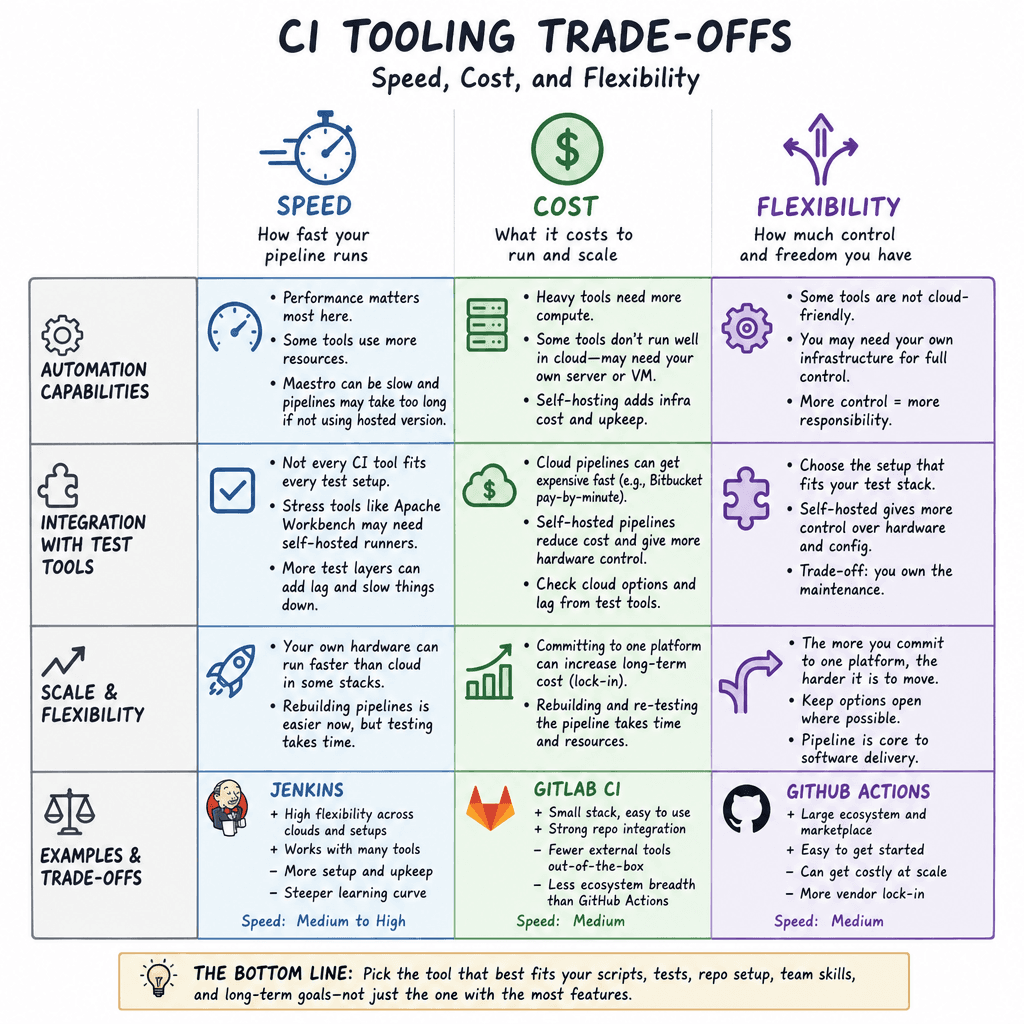
Check how the tool acts inside the pipeline. Some tools use more resources than others. Some will not run well in a cloud-hosted pipeline, so you may need your own server or VM.
Performance matters most here. Maestro is a good example. If you do not buy the hosted version, setup can take a lot of time. The tool can feel slow, and the pipeline may take too long.
Integration with Test Automation Tools
Not every continuous integration tool fits every test setup. A stress tool like Apache Workbench may not run well in a cloud-hosted pipeline. In that case, a self-hosted runner may be the better fit.
For example, some teams run a lot of UI and E2E tests. A cloud Bitbucket pipeline can get costly fast if you pay by the minute. A self-hosted pipeline can cut cost and give you more control over hardware, but you also take on more upkeep.
It also helps to check whether your test automation tools have cloud options and how much lag they add. More test layers can mean more cost. On some stacks, your own hardware can run faster than the cloud.
Scale and Flexibility
The more you commit to one platform, the harder it can be to move away from it. In the AI age, rebuilding a pipeline is easier than before. Even so, the pipeline is still a core part of software delivery.
If you rebuild your pipeline, you must test it all again. That takes time. So choose your path with care.
Jenkins gives a lot of freedom across cloud platforms. The trade-off is more upkeep.
GitLab CI gives a smaller stack and a strong repo link, but you may lose some of the wider tooling that comes with GitHub Actions.
Popular Continuous Integration Tools
Jenkins
Jenkins is a flexible and highly customizable continuous integration tool. It is a good choice when you want to avoid vendor lock-in and can handle the upkeep.
CircleCI
CircleCI is a hosted option that gives you a flexible path away from vendor lock-in. It can work well for larger, platform-specific teams.
Travis CI
Travis CI suits workloads with special hardware needs. It runs as a VM, not a Docker container.
GitLab CI/CD
GitLab CI/CD is a platform runner for the GitLab repo. You can self-host it, which gives you a mix of flexibility and control while staying in the GitLab ecosystem.
Best Practices for Implementing Continuous Integration Tools
Start with the problem, then find the tool. Do not pick a tool first and force your process around it. One tool will not solve every issue, so avoid vendor lock-in where you can.
Choose the Right Tool for Your Team
For most teams, the first issue is performance. Cost comes next. You want a fast pipeline so you can deploy with little delay, but you should not cut corners on quality.
Sometimes it makes sense to run your own hardware. That works best when the price fits and your team has the skills to maintain it. DevOps still needs a lot of know-how, especially in networking and hardware.
Integrate Early and Often
You do not need every integration to use the same setup. It is better to keep separate pipelines for each environment.
Avoid complex tooling on developer branches, since that can slow integration. Quality gates should sit between dev and staging, not between dev and a branch.
Keep a steady release pace so staging runs often. That helps stop low-quality work from piling up.
Monitor and Optimize Pipeline Performance
At first, your pipeline may be small. Then you may not need much tuning. As the software grows, though, you will need to watch quality gates and keep the system in shape.
Pick tools that make tuning easier. GitHub Actions is strong for visibility. If you self-host, it can be harder to find the cause of slowdowns, but you get more control and more room to fix them.
Continuous Integration and Continuous Delivery Tools
New tools keep coming to market as AI changes how software ships. Still, it is wise to pick tools that can grow with your company.
Good balanced choices include:
- Self-hosted runner: GitLab CI, best when you want your own hardware and your own cloud repo
- Hosted: GitHub Actions, or the tool your team already uses for repo storage
- Self-hosted: Jenkins, best for long-term power and flexibility, but it needs a lot of setup
Q&A
Question: What is the main purpose of continuous integration tools?
Short answer: Continuous integration tools help teams merge, test, and check code changes with less manual work. They protect code quality and stability by running scripts and automated tests before software moves on.
Question: Should a team choose a hosted CI tool or a self-hosted runner?
Short answer: It depends on cost, speed, test needs, and your DevOps skills. Hosted tools like GitHub Actions are easier to manage. Self-hosted runners give more control and can be faster for some workloads.
Question: Why is compatibility with test automation tools important?
Short answer: Not every continuous integration tool fits every test setup. Some UI, E2E, mobile, or stress tests can be slow or costly in the cloud. Checking fit early helps avoid slow builds and surprise costs.
Question: Where should quality gates be placed in a CI pipeline?
Short answer: Put quality gates between dev and staging when you can. Avoid heavy gates on developer branches, since they can slow integration. Separate pipelines by environment and keep staging active often.
Question: Which continuous integration tool is best for avoiding vendor lock-in?
Short answer: Jenkins is often the best long-term pick for avoiding vendor lock-in, but it needs more setup and upkeep. GitLab CI/CD can also be a strong middle ground if you want to self-host within the GitLab ecosystem.